
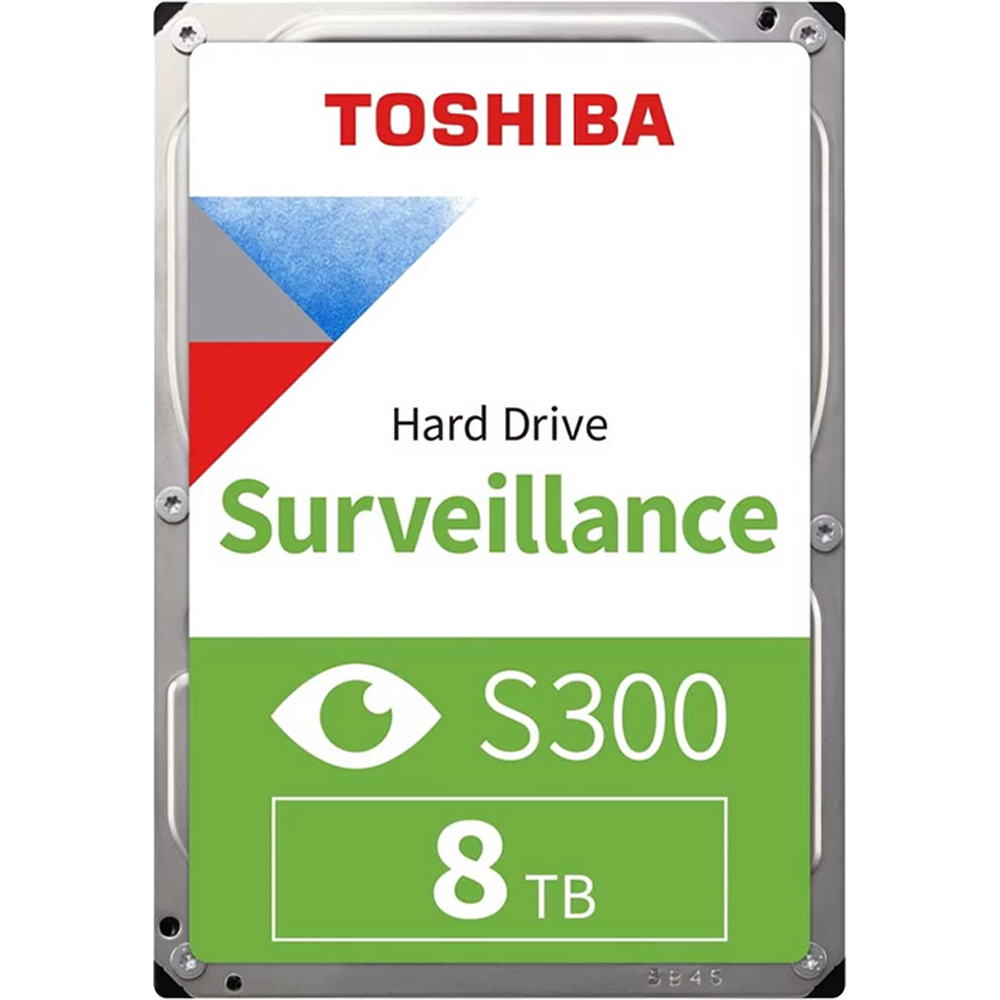
Toshiba S300 PRO 8TB 3.5″ Surveillance HDD
$2,498.00
Availability: Only 2 left in stock
Toshiba S300 PRO 8TB HDD | 24/7 Surveillance Hard Drive
Need reliable storage for security cameras? The Toshiba S300 PRO delivers steady, always-on performance. First, it holds a massive 8TB of recording space. Because of this capacity, you store weeks of footage. Also, it supports up to 64 high-res cameras. Moreover, the drive runs 24 hours a day. Consequently, your surveillance system never misses a moment. Finally, its high-endurance design handles constant write cycles.
Key Features & Real Benefits
- 8TB High Capacity – Store days or weeks of HD video safely. As a result, you rarely delete old clips.
- Built for 24/7 Use – This drive is made for non-stop recording. Because it runs cool, it lasts longer.
- Supports Up to 64 Cameras – One drive handles many camera feeds at once. So, you scale systems without extra hardware.
- 7200 RPM Fast Speed – Quick data access means faster video search. Plus, playback stays smooth with multiple streams.
- 512MB Large Cache – This big buffer reduces data bottlenecks. Therefore, video writes stay steady during peaks.
- CMR Technology – Conventional Magnetic Recording ensures reliable writes. Moreover, it avoids SMR pitfalls for surveillance.
- SATA III Interface – The 6 Gbit/s link moves data fast. So, footage transfers without lag or delay.
- High-Endurance Design – Tough components handle constant recording stress. Also, vibration resistance keeps performance stable.
Ideal Use Cases
Home Security Systems – Record footage from doorbell and yard cameras. Since the drive runs quietly, it fits home spaces.
Small Business Surveillance – Protect your shop, office, or warehouse. Moreover, 8TB covers multiple angles for weeks.
RAID Storage Arrays – Use in multi-drive setups for extra safety. Because it supports RAID, data stays protected.
Hybrid DVR/NVR Systems – Works with analog and IP cameras alike. So, you mix old and new gear easily.
Technical Specifications
| Feature | Detail |
|---|---|
| Brand/Model | Toshiba S300 PRO (MD10ADA800V) |
| Capacity | 8TB |
| Form Factor | 3.5-inch internal HDD |
| Interface | SATA III (6 Gbit/s) |
| RPM | 7200 |
| Cache | 512MB |
| Recording Tech | CMR (Conventional Magnetic Recording) |
| Operation | 24/7 continuous recording |
| Camera Support | Up to 64 HD cameras |
| Workload Rate | Up to 550TB/year |
| MTTF | 2 million hours |
| Vibration Resistance | Yes (for multi-bay systems) |
| Warranty | 3-year limited |
Why Choose the Toshiba S300 PRO?
Security pros trust Toshiba for reliable storage. Indeed, the S300 PRO is built for surveillance work. Because it handles constant video writes, it won’t fail. Moreover, the 7200 RPM speed keeps playback smooth. As a result, you find clips fast when needed. Also, the 512MB buffer prevents dropped frames. Therefore, your footage stays complete and clear. Finally, the 3-year warranty gives peace of mind.
Setup & Care Tips
- Install the drive in your DVR or NVR. Then, connect SATA power and data cables.
- Format the drive using your recorder’s setup menu. Because this step prepares the drive, do not skip it.
- Enable continuous recording mode in system settings. So, the drive captures footage around the clock.
- Check drive health monthly via recorder tools. If you see warnings, back up footage first.
- Keep your recorder in a cool, dry spot. Therefore, the drive stays cool and runs longer.
Frequently Asked Questions
Q: Will this work with Hikvision or Dahua DVRs?
A: Yes. Since it uses standard SATA, it fits most brands. So, setup is quick and easy.
A: Yes. Since it uses standard SATA, it fits most brands. So, setup is quick and easy.
Q: Can I use this in a regular PC?
A: Yes. It works for desktop storage too. However, it is optimized for surveillance workloads first.
A: Yes. It works for desktop storage too. However, it is optimized for surveillance workloads first.
Q: How many hours of video can 8TB hold?
A: It depends on resolution and compression. But, expect weeks of 1080p footage per camera.
A: It depends on resolution and compression. But, expect weeks of 1080p footage per camera.
Q: Does it support RAID?
A: Yes. Because it is built for multi-drive arrays, RAID 0/1/5/10 work well.
A: Yes. Because it is built for multi-drive arrays, RAID 0/1/5/10 work well.
Q: Is CMR better than SMR for surveillance?
A: Yes. Since CMR handles constant writes better, it avoids slowdowns. Therefore, it is the safer choice.
A: Yes. Since CMR handles constant writes better, it avoids slowdowns. Therefore, it is the safer choice.
Q: What if the power goes out?
A: The drive handles sudden power loss safely. However, using a UPS backup is still recommended.
A: The drive handles sudden power loss safely. However, using a UPS backup is still recommended.

| Weight | 1.6 lbs |
|---|---|
| Dimensions | 5.79 × 4 × 1.03 in |
Only logged in customers who have purchased this product may leave a review.
Related products
-
Razer DeathAdder Essential White
$298.00


Reviews
There are no reviews yet.