
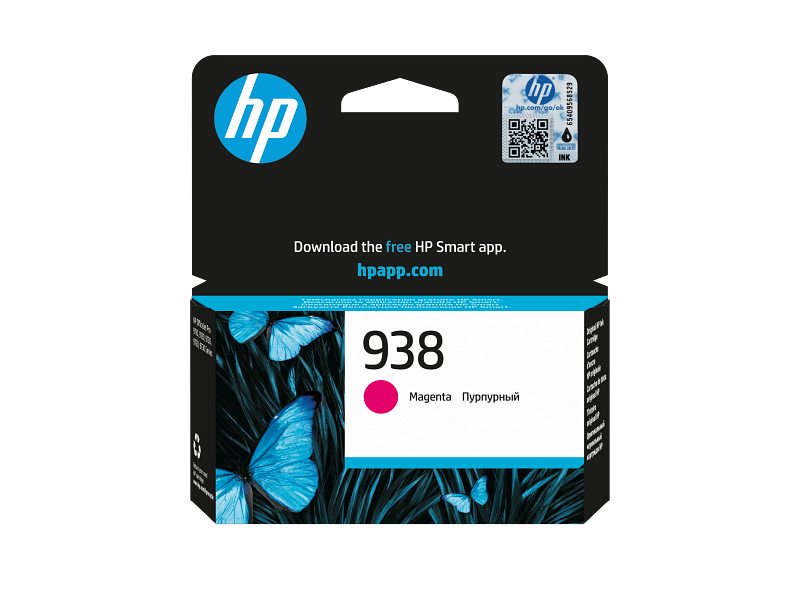
HP 938 Magenta Original Ink Cartridge
$298.00
Availability: In stock
HP 938 Magenta Ink Cartridge | Original, 800 Pages, Vibrant Color
Need bold color for your daily prints? The HP 938 magenta ink delivers rich, vivid results. First, it uses original HP inkjet technology. Because of this, colors stay true and bright. Also, it prints up to 800 pages reliably. Moreover, the formula resists fading over time. Consequently, your documents look professional for months. Finally, it installs easily in compatible HP printers.
Key Features & Real Benefits
- Vibrant Magenta Tones – Get rich, eye-catching color on every page. As a result, graphics and charts pop.
- 800 Page Yield – Handle daily prints without frequent swaps. So, your workflow stays smooth.
- Original HP Quality – Trust tested engineering and precise drops. Because of this, streaks stay rare.
- Consistent Output – Enjoy steady results from page one. Moreover, quality never drops mid-job.
- Fade-Resistant Ink – Colors stay bright for long periods. Therefore, your presentations keep looking fresh.
- Easy Installation – Drop it in and print fast. Plus, setup takes just seconds.
Ideal Use Cases
Office Reports – Print charts, graphs, and client proposals. Since color accuracy is high, data stands out.
Marketing Materials – Create flyers, brochures, and banners. Because magenta stays vibrant, designs grab attention.
Home Projects – Print photos, cards, and school tasks. Moreover, smooth ink flow prevents messy prints.
Creative Work – Produce sharp digital art and layouts. Therefore, your portfolio looks polished and pro.
Why Choose This Ink?
Offices trust HP for dependable supplies. Indeed, the 938 blends quality and value. Because it uses precision nozzles, prints stay sharp. Moreover, the 800-page yield cuts replacement costs. As a result, your team focuses on real work. Also, fade-resistant formulas protect important files. Therefore, you print with a clear mind. Finally, it pairs safely with HP OfficeJet models.
Setup & Care Tips
- Open your printer cover gently. Then, remove the empty cartridge.
- Unbox the new magenta ink. Because the seal protects freshness, peel it slowly.
- Slide it into the color slot. So, it clicks firmly into place.
- Close the cover and run a clean cycle. Plus, check for even, bright color.
- Store spares in a cool, dry spot. Therefore, the ink stays fresh for months.
Frequently Asked Questions
Q: Is this right for my printer?
A: Yes. Since it fits select HP OfficeJet models, check your label first. So, you avoid wrong parts.
A: Yes. Since it fits select HP OfficeJet models, check your label first. So, you avoid wrong parts.
Q: How many pages will it print?
A: Up to 800 pages at standard coverage. However, heavy photos will use more ink.
A: Up to 800 pages at standard coverage. However, heavy photos will use more ink.
Q: Is original ink worth the cost?
A: Yes. Because HP tests each cartridge, clogs stay rare. Therefore, prints stay reliable.
A: Yes. Because HP tests each cartridge, clogs stay rare. Therefore, prints stay reliable.
Q: Can I store it long-term?
A: Yes. Keep it sealed in its bag. Plus, avoid heat and direct sun.
A: Yes. Keep it sealed in its bag. Plus, avoid heat and direct sun.
Q: Will it void my printer warranty?
A: No. Since it is an original HP part, your warranty stays safe. So, you print with confidence.
A: No. Since it is an original HP part, your warranty stays safe. So, you print with confidence.

| Weight | 0.3 lbs |
|---|---|
| Dimensions | 1.8 × 4.6 × 4.9 in |
Only logged in customers who have purchased this product may leave a review.
Related products
-
Epson Ink Bottle – Black
$148.00
Reviews
There are no reviews yet.